Create user-friendly income statements in Power BI
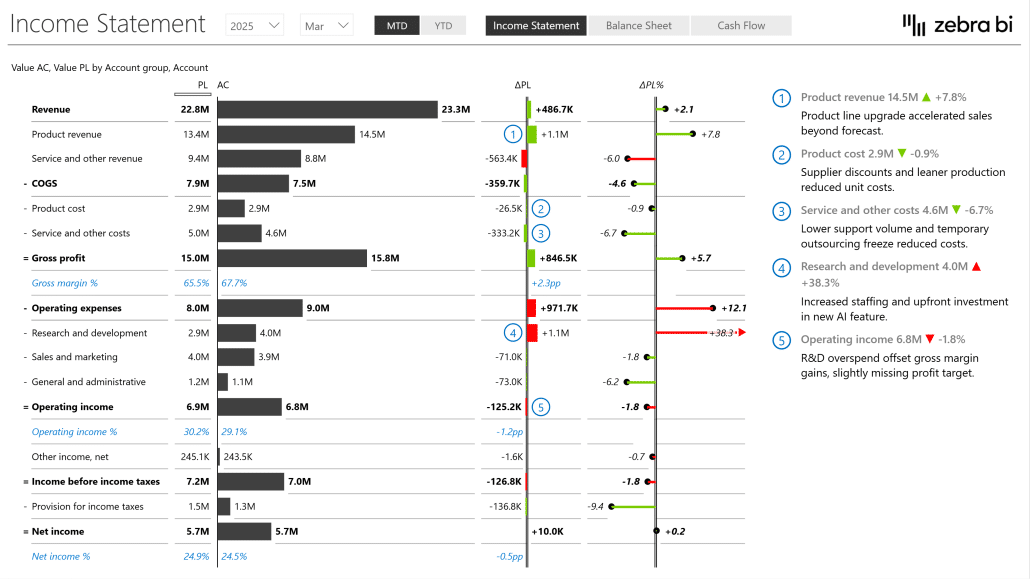
Join our webinar to learn how to use Power BI to design income statements that are:
- user-friendly,
- easily understandable, and
- actionable.
Wat je leert:
Presentator


Founder & CEO at Zebra BI
Andrej brings 25 years of experience in business intelligence and software development and 20 years as a consultant. Helping numerous international and regional companies achieve consistent and efficient internal reporting throughout the organization inspired him to build Zebra BI.
Learn how to create awesome income statements in Power BI!
The Income Statement (or Profit & Loss Statement) is one of the most commonly used financial statements. We know it takes a lot of time to extract the most important insights from the usual "tabular" income statements our goal is to make everything easier for you.
Bekijk op aanvraag
Watch the video

Zebra BI-webinars zijn al bezocht door meer dan 10.000 deelnemers!