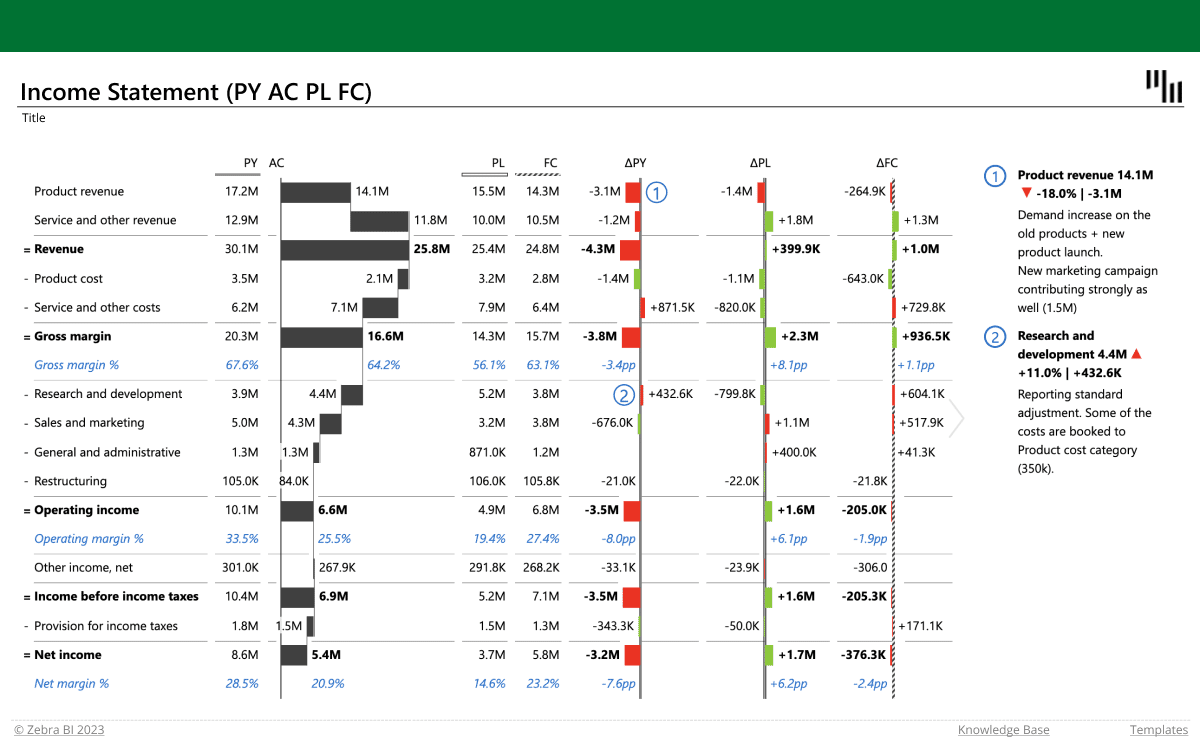
Income statement in Excel (PY-AC-PL-FC)

Zebra BI for Excel
Overview
The most advanced Excel template for visualizing your profit & loss data and comparing your actual values with previous year's, the plan and forecast. It uses tables with integrated vertical waterfall charts and includes features such as the formula manager and custom calculations. It also displays absolute and relative variances that are calculated automatically.
Get started in 3 steps
1
Download & Open
Download the .xls file and open it in Excel
2
Connect Your Data
Replace sample data with your CRM, ERP, or database source
3
Customize & Publish
Adjust KPIs, colors, and branding, then publish to Power BI Service
Fill out the form and get the Excel template

20,000+ users have downloaded this template