Long-Term Assets and CapEx Report Excel Template

Overview
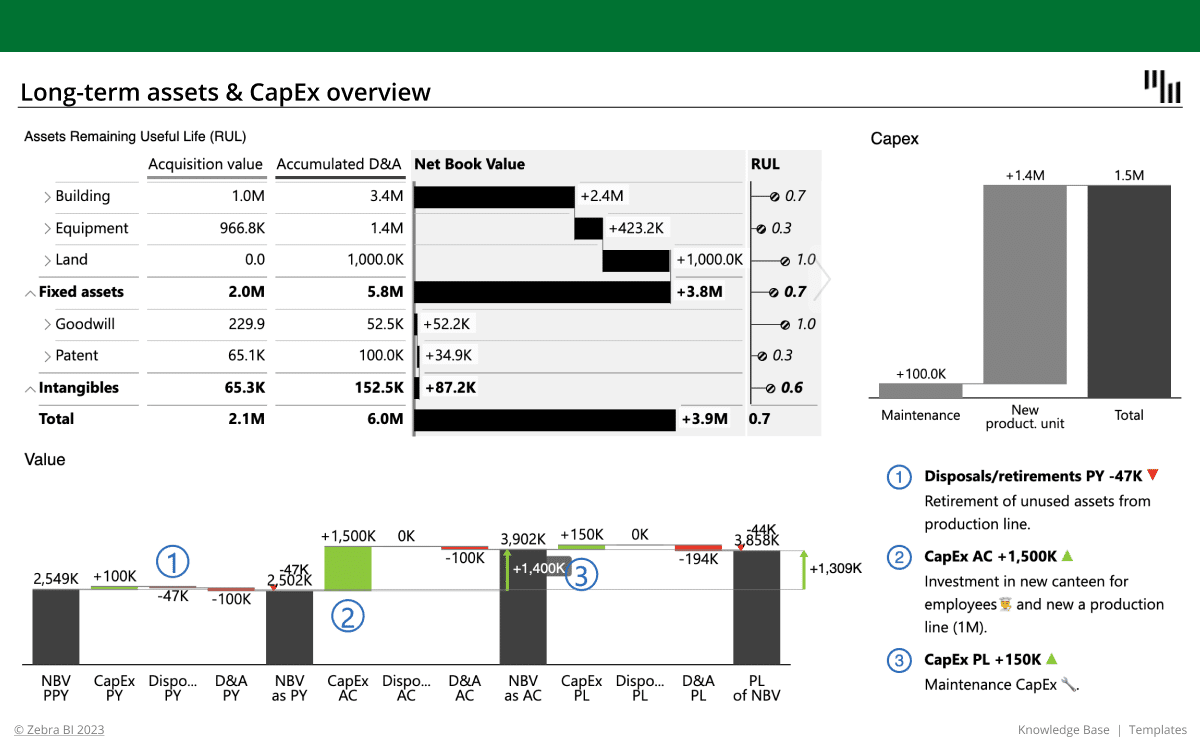
The Long Term Assets and Capex Report Excel template is a comprehensive tool designed to help businesses analyze and manage their non-current assets and capital expenditures effectively.
Maximize Your Company's Potential with the Long-Term Assets and CapEx Report Excel Template
In the competitive world of business, leveraging the Long Term Assets and CapEx Report Excel template to analyze your company's long-term assets and capital expenditures (CapEx) can make a significant difference in growth prospects and financial health. This comprehensive template is designed to help businesses efficiently assess the value, performance, and risk associated with their non-current assets and capital investments.
Long-Term Assets Analysis with the Excel Template
Utilizing the Long Term Assets and CapEx Report Excel template to perform long-term assets analysis enables businesses to determine the worth, future earnings potential, and associated risks of their non-current assets, which include property, plant, equipment, and intangible assets like patents and trademarks. Examining long-term asset values and performance trends provides insight into growth prospects and strategic direction.
Estimating Remaining Useful Life (RUL) Using the Excel Template
The Long Term Assets and CapEx Report Excel template assists businesses in accurately estimating the remaining useful life (RUL) of their assets, which is the estimated time an asset will continue to provide economic benefits before being retired or replaced. RUL estimation plays a critical role in determining depreciation expenses, which can significantly impact a company's financial statements. Proper RUL estimation allows businesses to manage capital expenditures effectively and plan for future investments in new assets.
Capital Expenditures (CapEx) Evaluation Made Easy with the Excel Template
The Long Term Assets and CapEx Report Excel template simplifies the process of evaluating capital expenditures (CapEx), which are the funds a company spends to acquire, upgrade, or maintain long-term assets. Understanding CapEx is crucial for assessing a company's financial health and its capacity to invest in growth and expansion. Analyzing CapEx also offers insights into a company's strategic priorities and approach to managing and maintaining its assets.
Unlock the Full Potential of the Long-Term Assets and Capex Report Excel Template
By harnessing the power of the Long Term Assets and Capex Report Excel template, businesses can:
- Assess long-term asset value and performance: Input data on your company's long-term assets and track their performance over time to understand their worth and potential earnings.
- Evaluate risks associated with long-term assets: Identify potential risks and areas of concern by analyzing trends in asset values and performance, enabling informed investment decisions.
- Estimate asset remaining useful life: Utilize the template's calculations to estimate the remaining useful life of assets, allowing for better planning of depreciation expenses and future capital investments.
- Track and analyze CapEx: Monitor and evaluate your company's capital expenditures to gain insights into investment strategies and asset management practices.
- Make informed decisions: Use the comprehensive analysis provided by the Long Term Assets and Capex Report Excel template to gain valuable insights into your company's financial health, growth prospects, and strategic direction.
The Long Term Assets and Capex Report Excel template is an indispensable tool for businesses seeking to deepen their understanding of long-term assets and capital expenditures. This template empowers businesses to assess the value, performance, and risk of their investments, plan for future asset acquisitions, and make informed decisions about their company's strategic direction, ultimately leading to long-term
Get started in 3 steps
Fill out the form and get the Excel template