Cash Flow Statement template

Overview
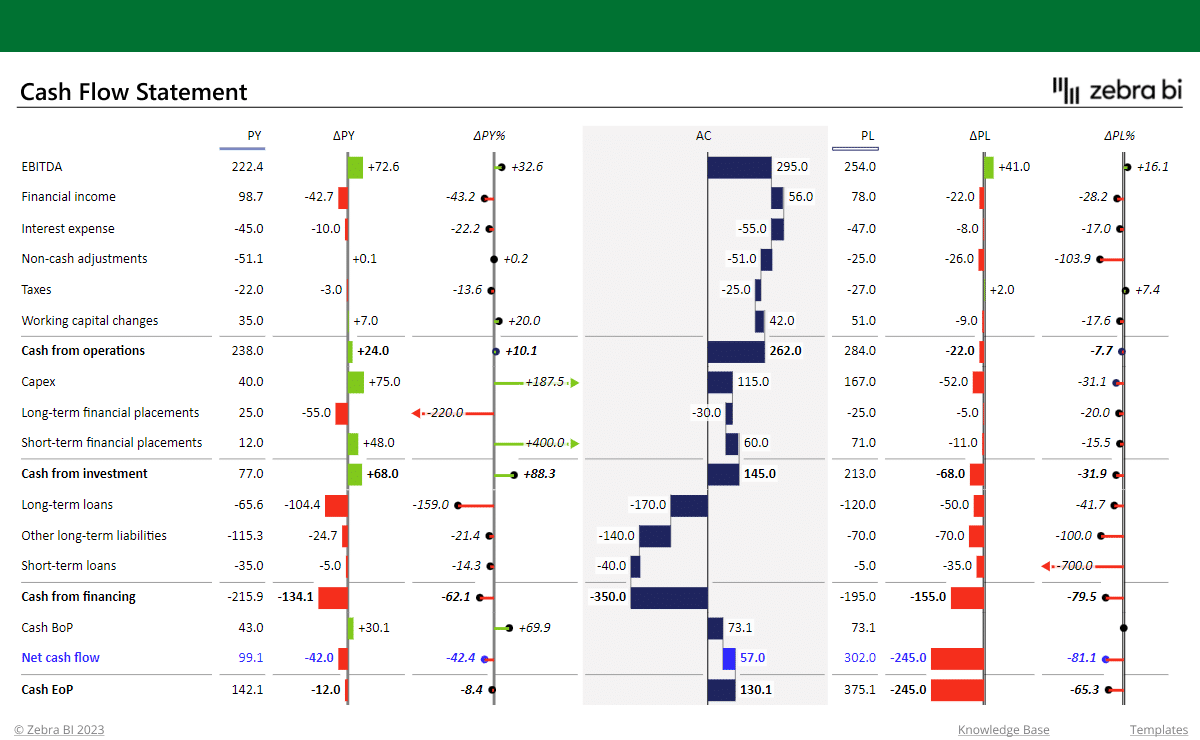
This free cash flow statement template is designed to help you visualize how cash flow from Operations, Investment & Finance contributes to your net cash flow. With an intuitive table that includes integrated charts, you can easily compare your actual numbers to the previous year's and the plan. Additionally, you can add even more context with comments.
Keep track of your cash flow with ease
With its intuitive design, this cash flow Excel template provides a clear picture of your company's cash inflows and outflows, helping you make data-driven decisions with confidence. The template includes Zebra BI Tables with integrated waterfall charts that visualize the contributions to the final result. The actual values (AC) of cash inflows, cash outflows, and net cash flow are compared to the previous year (PY) and plan (PL) for additional context.
The fastest way to get insights
The automatically calculated variances provide immediate insights into the changes in your cash flow position. This way, you can easily identify areas that need more attention and make adjustments to your cash management strategy. Additionally, the template includes comments that allow you to explain the 'why' behind the numbers directly in the visual. As a result, it becomes easier for you to share information about your company's performance with colleagues and stakeholders.
Experience the world of actionable financial reporting
Download this free cash flow Excel template made with Zebra BI for Office to simplify the process of creating cash flow statements. Use Zebra BI's cash flow statement example and take the hassle out of financial reporting and get insights into your business's financial health with ease. Prefer to create your cash flow statements from scratch? Check out our step-by-step guide & learn how to make your best one yet.
Inside this template
Get started in 3 steps
Fill out the form and get the Excel template