September 8th
 February 22nd

Date of publication: 13 August 2026. Supersedes the version published 29 May 2022.
Applies to: every Zebra BI custom visual for Microsoft Power BI. A package is certified, and covered by section 3, only if it comes from a Zebra BI listing in Microsoft AppSource that Microsoft marks as certified. Three of our listings carry that mark as of this publication date: Zebra BI Tables, Zebra BI Charts and Zebra BI Cards. Every other package is uncertified and covered by section 4, including Tables+ and Charts+, and any build of those visuals that you obtain from us rather than from AppSource, for which section 1.1 applies as well.
At a glance
Certification is a property of the package, not the product name. This document describes certified and uncertified packages separately, because the controls that hold for one do not all hold for the other.
The certified visuals make no network calls of any kind. They run inside the Power BI custom visual sandbox, receive data through the Power BI Custom Visuals API, render it in the browser, and send nothing anywhere. Microsoft re-tests this at each release as a condition of certification, and section 3.3 sets out what that testing covers.
The uncertified visuals on AppSource make external network calls. Viewer commenting cannot work without them: writing a comment means writing to storage, and identifying its author means an authenticated identity. Microsoft's certification programme forbids external calls, so these visuals are not certified and cannot be while they carry commenting.
Not every uncertified package makes those calls. Packages we supply you directly, rather than through an AppSource listing, are uncertified because Microsoft never verified them, and in the versions shipping today they make no external calls. A future version may make external calls where a feature requires it. Section 1.1 covers them and is the section to read if that is what you hold.
In every package covered by this document, the data you put into a Zebra BI visual is never transmitted to Zebra BI. Your report data stays in your Power BI tenant. Comment data is written to a file in your own SharePoint. Zebra BI operates no store of customer report data or comment content, and our staff have no access to either unless you share a report with us yourself.
What we never do
These four hold for every Zebra BI Power BI visual, certified or not, in every version we ship. They are not conditional on configuration, tier or which package you installed.
- We never receive or store the business or financial data in your reports. Values, labels, measures and the model behind them stay in your Power BI tenant. They are not transmitted to us, not stored by us, and not present in any analytics we collect.
- We never receive or store the content of comments. Comment data is written by the visual, in the user's browser, straight to a file in your own SharePoint. It does not pass through Zebra BI infrastructure.
- We never store the identity of your users obtained through authentication. Where an identity token reaches our token service, it is verified, used for the exchange and discarded. We keep no user directory, no user profile and no mapping from a person to anything.
- We never sell your data, share it with anyone for their own purposes, or use it to train AI models. The only third parties involved in operating these visuals are Microsoft, which hosts both your tenant and our own token service, and the analytics processor named in section 4.6, which acts only on our instructions and receives nothing from the certified visuals. Section 5 sets out what runs where.
We do store product usage analytics from Zebra BI Tables+ on AppSource: a small set of interaction events that carry no report data and no comment content, and that identify your organization. Section 4.6 sets out what those events contain and how long we keep them, and section 4.4 covers the one operational log our token service keeps. Section 4.6 names the endpoint to block if you want none of it.
1. Which visual are you assessing
Certification attaches to a specific package from a specific place, not to a product name. A Zebra BI visual is certified only if its package comes from a Zebra BI listing in Microsoft AppSource that Microsoft marks as certified. Coming from AppSource is not sufficient, because we list uncertified visuals there too. Everything without that mark is uncertified, including builds of the certified visuals that you obtain from us directly.
Microsoft, not Zebra BI, awards and displays the mark, and Microsoft's documentation on certified Power BI visuals sets out where it appears: a badge titled PBI Certified on the AppSource listing, a certified badge on a visual imported from within Power BI Desktop or the Power BI service, and a Power BI Certified filter in the in-product gallery that shows certified visuals only. The same documentation states that Microsoft reserves the right to remove a visual from the certified list at its discretion, so check the badge on the listing you install from.
| What you have | Certification | External network calls | Which section applies |
|---|---|---|---|
| Zebra BI Tables, Charts or Cards, from an AppSource listing with the certified badge | Microsoft-certified | None | Section 3 |
| Zebra BI Tables+ or Charts+ Beta, from an AppSource listing without the certified badge | Not certified, by design | Yes, see section 4 | Section 4 |
| Zebra BI Tables, Charts or Cards supplied by us as a package, for your organizational store or with a licence embedded | Not certified | None in the packages shipping today, see 1.1 | Section 4, with 1.1 |
Both uncertified cases above are covered by the Zebra BI End-User License Agreement for Uncertified Visuals, which governs every Zebra BI Power BI visual we distribute without Microsoft certification, whether it exists today or is released later. As of this publication date the uncertified visuals on AppSource are Zebra BI Tables+ and Zebra BI Charts+, both listed as Beta.
Zebra BI for Microsoft Excel and PowerPoint is a separate product with its own assessment at zebrabi.com/legal/?doc=security-office. Zebra AI is a separate hosted service and is not covered here.
1.1 Packages you get from us rather than from AppSource
Some organizations install Zebra BI Tables, Charts or Cards as a package we supply directly, either for upload to the Power BI organizational store or with a licence already embedded. These are separate builds with their own identifiers, not the certified AppSource package. They do not carry Microsoft certification. The assurance in section 3 rests on Microsoft's verification and does not extend to them, so they are assessed as uncertified.
In the versions shipping today these packages make no external network calls at runtime. The code paths that would make those calls are removed at compile time, in the same way they are for the certified build, so they are not present to be called. The manifest may nonetheless declare hosts the package never contacts: the manifest and the compiled behaviour are produced by different steps of our pipeline, and the manifest does not follow the code when the code changes. To have the declared list reconciled against the build for the version you hold, contact support@zebrabi.com.
These packages are not barred from communicating externally in the way the certified ones are, and a future version may do so where a feature requires it. The preceding paragraph is therefore a statement about the versions shipping today rather than a property of the package type. Where a package we supply begins making external calls, the hosts are listed in section 4.3.
A Power BI administrator can also add a certified AppSource visual to your organizational store. That remains the certified package, with section 3 applying unchanged. What determines certification is where the package came from, not how it reaches the user.
Most of section 4 does not apply to these packages. They are governed by the EULA for Uncertified Visuals and by the release, vulnerability and organizational controls in sections 6 to 10. Sections 4.2 to 4.6 do not describe the packages shipping today: those make no external calls, so they contain no commenting, no identity flow and no usage analytics to assess. Read 4.1, 4.7 and 4.8, then sections 6 to 10.
2. Company and contact
ZEBRA BI informacijske rešitve d.d., Pot za Brdom 104, 1000 Ljubljana, Slovenia. Company ID 6629997000, VAT ID SI 35190108.
Zebra BI is an independent software vendor. We publish standard software products and do not provide custom development or professional services engagements.
Report security vulnerabilities and suspected security incidents to security@zebrabi.com. Everything else, including questions about this document, privacy and data-subject requests, and anything arising from a security review, goes to support@zebrabi.com or +386 1 256 0286.
Zebra BI management holds accountability for information security, with roles and responsibilities assigned in writing for risk assessment, access control, system ownership, incident reporting and personnel security.
3. Certified visuals: Tables, Charts and Cards from AppSource
3.1 How they run
The visual runs in the Power BI custom visual sandbox, an iframe with no access to the host page, to other visuals on the report, or to the network. It receives data through the Power BI Custom Visuals API, transforms it in the memory of the user's device, and draws the result. It cannot modify or write back the underlying data.
Your report data resides in the Power BI platform and in your own upstream data sources. Data residency for that data is determined by your Power BI tenant and Microsoft's service design, not by Zebra BI.
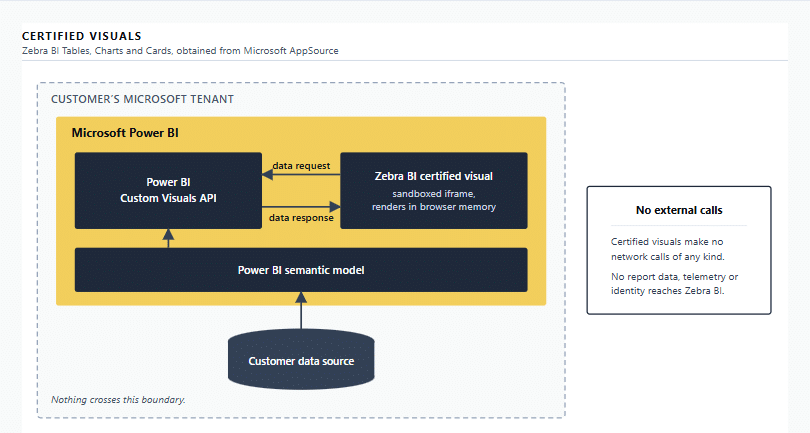
Figure 1. Certified visuals, installed from Microsoft AppSource. Data reaches the visual through the Power BI Custom Visuals API and nothing crosses the tenant boundary.
3.2 No external communication
The certified packages declare no external hosts and no authentication privilege in their manifest, and the code paths that would make network calls are removed at compile time rather than merely switched off. There is no telemetry, no licence call, no feature-flag lookup and no analytics endpoint. Nothing leaves the Power BI platform.
The declared privileges of the certified packages published on AppSource are, in full, ExportContent and LocalStorage. This is a property of how the certified build is produced, and This is a property of how the certified build is produced. Microsoft's certification requirements do not permit a certified visual to declare external host access; see section 3.3. It holds for the packages live today and for every update that follows, for as long as they carry Microsoft certification.
You can confirm this yourself. In Power BI, open the visual's About dialog and review its declared privileges, or download the package from AppSource and read capabilities.json inside it. Section 4.7 describes the same procedure for the uncertified visuals.
3.3 What Microsoft certification covers, and what it does not
Microsoft states that certified Power BI visuals in AppSource are tested to verify that they do not access external services or resources and that they follow secure coding patterns and guidelines, that every submitted update goes through the same checks, and that its testing includes code review, static analysis, data-leakage testing and injection testing. See Microsoft's documentation on certified Power BI visuals.
Certification is a code-level verification performed by Microsoft on each submitted update. It is not a statement about Zebra BI's internal security programme, our training, our tooling or our corporate controls. Those are covered in sections 6 to 10. Because this testing is Microsoft's rather than ours or an independent assessor's, we cannot supply a third-party penetration test report for the certified visuals.
3.4 Authentication and access
The certified visuals require no Zebra BI login and no identity. They are unlocked by a licence key, valid for one year and reissued on renewal. Sign-in, user provisioning, group membership, workspace access and row-level security are handled entirely by Power BI and Microsoft Entra ID. The visual neither monitors nor manages access to Power BI. Where you use shared or generic Power BI accounts, the visual sees only that account and cannot distinguish the individuals behind it.
Zebra BI personnel have no access to your Power BI tenant, reports, datasets or report data. Even for troubleshooting, our staff can only see a report if you explicitly share one with us.
4. Uncertified visuals
Sections 4.2 to 4.7 describe Zebra BI Tables+ and Charts+ as installed from Microsoft AppSource, the uncertified visuals that communicate externally. Any other uncertified package is covered by 4.1, 4.7 and 4.8 and by sections 6 to 10: a package we supply directly, covered in section 1.1, and any package from a listing that does not carry the certified mark when you install it. For those, contact support@zebrabi.com about the version you hold.
Packages we supply to you directly, covered in section 1.1, are also uncertified and are governed by the same agreement, but almost none of what follows describes the ones shipping today: they make no external calls, so there is no commenting flow, no identity exchange and no usage analytics to assess. For those packages, read 4.1, 4.7 and 4.8, then go to sections 6 to 10. Check 1.1 for the version you hold.
4.1 Why these are not certified
A defining requirement of Microsoft's "Power BI certified" designation is that the visual makes no external network calls. Viewer commenting requires them. A comment has to be stored somewhere durable and shared, and it has to be attributed to a real person, which means an authenticated identity. The two requirements are mutually exclusive. These visuals are therefore not certified, and will not be while they include commenting.
This is a deliberate product decision, not a lapsed certification. We make no representation that these visuals will be submitted for certification, and your Power BI administrator can block uncertified visuals tenant-wide.
4.2 Data flow
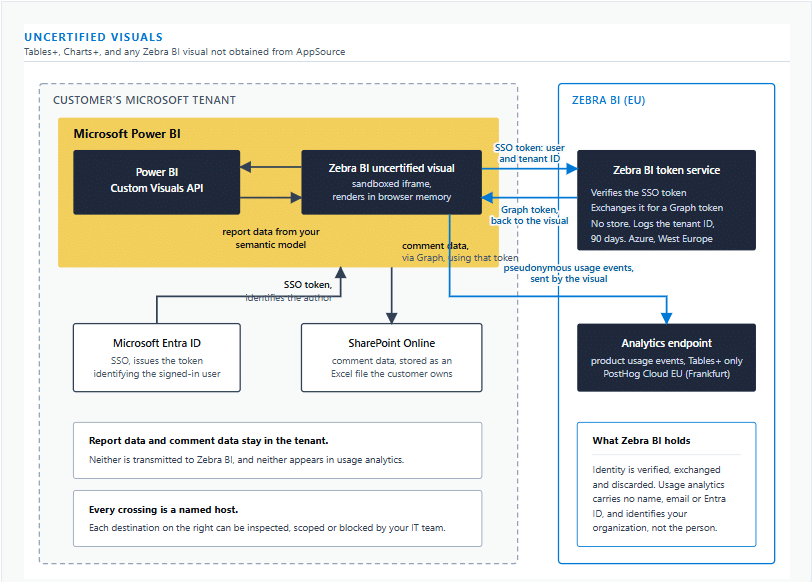
Figure 2. Uncertified visuals. Report data and comment text stay in the customer tenant. Two things cross to Zebra BI in the EU: the identity token, verified and exchanged in transit for a Microsoft Graph token and not stored, and pseudonymous product usage events from Tables+.
Report data reaches the visual exactly as it does in the certified build, through the Power BI Custom Visuals API, and it does not leave. Comment data travels to Microsoft Graph and lands in a file in your own SharePoint. Only two things cross into Zebra BI infrastructure: an identity token, which we exchange for a Microsoft Graph token and hand back to the visual, and a small set of product usage events. Both are described below.
4.3 External endpoints
The table below lists every host declared in the manifest of an uncertified visual on AppSource, and states which of them the visual contacts at runtime. The two sets are not the same.
A Power BI visual declares an allowlist of hosts in its manifest. That allowlist is what the platform permits; it is not a record of what the visual does. Ours is broader than our traffic, because the manifest and the compiled behaviour are produced by different steps of our pipeline and the manifest does not follow the code when the code changes. The Host column lists every host the manifest declares. The "Contacted at runtime" column states which of them a shipped package contacts.
Two qualifications apply to the declared list. Zebra BI Tables+ packages before version 8.3.1 declared a wildcard host allowlist rather than the explicit list below. That was a manifest defect, not additional traffic; every Tables+ package from 8.3.1 onward declares the explicit list. Charts+ already declares the explicit list, minus the analytics host, which it does not contact. A package you open today may declare more hosts than this table lists. No shipped package contacts more than the "Contacted at runtime" column states.
If a manifest and this table do not reconcile, ask us at support@zebrabi.com about the version you hold.
| Host | Contacted at runtime | Purpose | Processing location | If you block it |
|---|---|---|---|---|
graph.microsoft.com | Yes | Reads and writes comment data in your own SharePoint, and reads the signed-in user's own profile for comment attribution | Your Microsoft tenant, region set by Microsoft | Commenting stops working. Reporting is unaffected. |
api.zebrabi.com | Yes | Exchanges your Microsoft Entra SSO token for a Microsoft Graph token, so the visual can reach SharePoint as the signed-in user | Microsoft Azure, West Europe, behind Azure Front Door | Commenting stops working. Reporting is unaffected. |
eu.i.posthog.com | Yes | Product usage analytics, section 4.6 | PostHog Cloud EU, Frankfurt, Germany | Usage analytics stops and reporting is unaffected. See the note below on what else it forecloses. |
flagsmithzebra.eastus.cloudapp.azure.com | No | Feature flags. Flag values are compiled into the package when we build it, so the shipped visual never contacts this host. | Microsoft Azure, East US. Contacted by our build servers, never by your browser. | No effect. No request is made. |
apidev.zebrabi.com | No | Our non-production host, which our development and QA teams use to exercise the same package against a test environment. A production build resolves to api.zebrabi.com and never calls this host. Removing it from the manifest of production packages is tracked as a maintenance change. | Not contacted | No effect. No request is made. |
The manifest also declares wss://app.powerbi.com:8080, which is a Microsoft Power BI platform address rather than one of ours. No Zebra BI code calls it. Removing it from the declaration is tracked as a maintenance change; ask support@zebrabi.com for its status. Of the visuals on AppSource as of this publication date, only Tables+ contacts the analytics endpoint. Charts+ declares every host above except that one and sends no usage analytics.
On blocking the analytics endpoint, one consequence is worth stating rather than discovering later. Licensing does not depend on usage analytics today, so blocking it costs you nothing you currently have. It does close the path to things the data is meant to support: showing you your own utilisation and adoption across the seats you pay for, and simplifying provisioning and renewal so that you are not reconciling seat counts by hand. If that matters to you, block the endpoint now and tell us, and we will treat you as opted out when those capabilities arrive rather than assuming otherwise.
4.4 Identity and authentication
Commenting needs to know who is writing, so the uncertified visuals use Microsoft Entra single sign-on. Enabling it requires two steps by you: your Power BI administrator turns on SSO for AppSource visuals, and grants a one-time organizational consent to the Zebra BI application. Individual users then sign in as themselves. Without those steps the commenting features do not operate, and the reporting features are unaffected.
What the consent grants
The application requests three Microsoft Graph permissions. All three are delegated: they are exercised in the user's browser, as that user, and are bounded by what that user can already reach. It grants the visual no access the person using it does not already have, and it grants Zebra BI nothing: nobody here holds these permissions or can act with them.
| Delegated permission | Why the visual needs it | What it does not allow |
|---|---|---|
Files.ReadWrite.All | Writing comments into the comment workbook, and reading them back. The workbook is the only file the visual touches. | It reaches no file the signed-in user cannot already open, and it grants no access to your tenant as an organization. |
Sites.Read.All | Letting a report author browse SharePoint to choose the site and file where comments should be stored. | It is read-only, and it surfaces only sites and files the signed-in user can already find. It cannot write anywhere. |
User.Read | Reading the signed-in user's own profile, which is where a comment's author name comes from. | It is self-only. The visual cannot read your directory, enumerate users, or look up anyone other than the person using it. |
On the word "All" in two of those names. In a delegated permission, .All does not mean the whole tenant. It means everything the signed-in user already has access to, and nothing beyond it. Files.ReadWrite.All exercised by a user who can open three SharePoint files reaches exactly those three files. The scope name describes the breadth of the permission type, not the reach of the app. The equivalent application permission, which would grant tenant-wide access under Zebra BI's own identity, is not requested and is not held: there is no Zebra BI service account anywhere in this flow. Microsoft sets out the difference between delegated and application permissions in its overview of Microsoft Graph permissions.
None of these touches mail, calendars or Teams, and the visual writes to no file other than the comment workbook the report author selected. Consent is granted by your administrator, and revoked by your administrator, in Microsoft Entra without involving us. Section 4.5 covers what is stored in that workbook.
The permissions granted in your tenant are shown on the Microsoft Entra consent screen before approval, and afterwards at any time under Enterprise applications, in the permissions view. If that set does not match the three above, tell us at support@zebrabi.com. If it does not match the description here, tell us at support@zebrabi.com.
How the token exchange works
Two tokens are involved, with different audiences.
- Power BI issues the visual an access token whose audience is the Zebra BI API. This is the token that reaches us.
- The visual sends it to
api.zebrabi.com. Our service verifies the signature against your own tenant's published keys atlogin.microsoftonline.com, and checks the issuer and the audience. - Our service then performs a standard OAuth 2.0 on-behalf-of exchange with Microsoft Entra, against your tenant's own authority, to obtain a second token whose audience is Microsoft Graph.
- That Graph token is returned to the visual, in the user's browser. The visual calls Microsoft Graph directly with it. Zebra BI does not call SharePoint, and no comment data passes through our service.
Identity reaches Zebra BI infrastructure. From the verified token our service reads the signed-in user's Microsoft Entra object identifier, the tenant identifier and the token's subject claim. It uses them for the exchange and nothing else. Tokens issued by Microsoft Entra may carry further claims such as a name or user principal name; our service neither reads nor requires them.
Nothing is retained from the token itself. The service holds no database and no storage account, writes no token to any log, and keeps no user identity after the request ends.
Our service logs three records. The tenant identifier, as an operational metric so that we can count how many organizations use the feature; it is an organization GUID, not a person. The platform access log records the source IP address and user agent of each request. A failed request also writes a diagnostic entry carrying the error Microsoft Entra or Microsoft Graph returned. All of it sits in Microsoft Azure, West Europe, and is held for 90 days. We write no token or secret to any log, and we record no user object identifier or user name of our own.
4.5 Comment data
Comments are stored in an Excel workbook that you choose, in a SharePoint site that you own, inside your own Microsoft 365 tenant. You pick the site, folder and file through a picker in the visual. Zebra BI keeps no copy. Throughout this document, comment data means the whole stored record. Comment content means everything the visual writes into the content column: the comment text, the filter context it was made in, and the value of the data point it is anchored to.
Each comment is one row in a worksheet named Annotation, with columns for a unique identifier, type, tenant ID, user ID, user name, content, created and updated timestamps, and status. The content column holds the comment as a JSON string, including its text, the filter context it was made in, and the data point it is anchored to.
Permissions are file-level. SharePoint's securable object is the file, so every user who can open the comment workbook can read all of the comments in it. Read and write access are enforced by SharePoint and Microsoft Graph, because the visual calls Graph with the signed-in user's own delegated token: a user with read-only access to the file receives an authorization error on any attempt to write, and bypassing the visual's interface does not change that. The finer distinctions the interface makes, such as whether you may delete someone else's comment, are enforced in the browser and are enforced in the browser and are not a security boundary.
Row-level security does not extend to comments. A comment is anchored to a data point, and the value of that data point is written into the stored comment. A user whose row-level security scope hides a figure in the report can therefore read that figure by opening the comment workbook, if they have access to the file. The control is file placement: put the comment file where its SharePoint permissions match the audience that should see the underlying data, and use separate comment files for audiences with different data scopes.
Deletion is a status change. Deleting a comment in the visual marks its row as deleted and hides it. The text remains in the workbook and is readable by anyone who opens the file. To remove it, edit or delete the workbook in SharePoint. Earlier versions persist in SharePoint version history until you purge them.
Comment content is stored in clear text. The workbook carries no Zebra BI encryption or obfuscation layer. Encryption at rest and in transit for that file is Microsoft 365's, on your tenant's terms.
Everything else about that file is governed by you: retention, backup, versioning, audit and access all run through your own SharePoint and Microsoft 365 governance. SharePoint version history is the restore path, and you can use it without involving us. Audit logging of who opened or changed the file is Microsoft's, in your tenant, not ours. The visual provides no way to edit a saved comment: a comment can be added and marked deleted. The updated timestamp records status changes such as deletion.
4.6 Usage analytics
An uncertified visual may send a small set of product usage events to our analytics processor. Of the visuals on AppSource, this applies to Tables+ from version 8.3.1 onward. Charts+ sends none, earlier Tables+ packages contain no analytics code at all, and the certified visuals cannot carry it. To determine whether the version you have installed sends analytics, use the network-tab check in section 4.7 and look for a request to eu.i.posthog.com. The purpose and retention commitments below are the ones set out in the EULA for Uncertified Visuals.
One event is emitted, once, when the visual loads. It carries the visual name and version, which Power BI environment it is running in (Desktop, Service or Embedded), whether the report is open in view or edit mode, the licence tier and variation, and whether the licence has expired. Events are sent by a direct HTTPS request written for this purpose. There is no analytics SDK in the visual, so there is no automatic event capture, no session recording, no heatmaps and no click tracking.
We do not collect the business or financial data displayed in or bound to the visual, the content of comments, screenshots or renders of the visual, free-text input, or data from other visuals on the report page.
The per-user identifier is a random value generated fresh each time the visual loads. It is not stored on the device and does not follow a user between sessions or reports, so we cannot follow an individual's behaviour over time or connect events to a named person. At the organization level we do identify you: each event carries a one-way hash of your licence key, and your organization name is recorded against that hash so that we can tell one customer's usage from another's. The connecting IP address reaches the analytics processor as part of the HTTPS request and is stored with the event. Geolocation lookup is disabled on every event we send, so no city, postal code or coordinates are derived from it.
This data is therefore pseudonymous, not anonymous.
Our analytics processor is PostHog, acting as processor on Zebra BI's instructions, hosted in the European Union (PostHog Cloud EU, Frankfurt). For this processing Zebra BI is the data controller and the individual users are the data subjects; your organization is neither controller nor processor of it. Our lawful basis is legitimate interests under Article 6(1)(f) GDPR, supported by a documented assessment. Under the EULA for Uncertified Visuals we retain usage analytics for 24 months at event level, then delete or irreversibly aggregate it.
Power BI offers a tenant administrator no per-visual telemetry switch: the administrator's choice is to permit uncertified visuals or to block them. We do not currently ship a setting in the visual to turn usage analytics off. What we publish instead is the endpoint, eu.i.posthog.com, so your IT team can block it at the network level. Blocking it stops usage analytics. It does not change how the visual works; section 4.3 states what it forecloses.
Data-subject requests relating to usage analytics go to support@zebrabi.com, the contact named in our Privacy Policy for Visuals.
4.7 Verifying this yourself
Three checks you can run yourself, in rising order of effort:
- Open the visual's About dialog in Power BI and review its declared privileges.
- Open your browser's developer tools on a report page and watch the network tab while you load the report and add a comment. You will see requests to the hosts marked Yes in the table above, and no other requests from Zebra BI code.
- Download the
.pbivizpackage, which is a zip archive, and readcapabilities.jsoninside it. That file is the manifest: the list of hosts the platform will permit, not a record of what the visual contacts.
These checks cover the declared privileges, the declared host list and the traffic a package generates. They do not cover what our token service logs or how long it or our analytics processor retains data; those are stated in section 4.4 and section 4.6.
If you find a discrepancy between this document and what you observe, please tell us at support@zebrabi.com. We will correct the document, or the behaviour, whichever is wrong.
4.8 Administrative controls available to you
These apply to any uncertified visual, whether you obtained it from AppSource or from us.
- Restrict the tenant to certified visuals only, which blocks Tables+ and Charts+ entirely.
- Withhold or revoke organizational consent for the Zebra BI application, which prevents the identity and commenting features from operating.
- Scope SSO for AppSource visuals to specific security groups.
- Control which users can read or write comments through SharePoint permissions on the comment file.
- Block the analytics endpoint at the network level.
- Distribute through your organizational store instead of AppSource, so you control the version in use. If the package comes from us rather than from an AppSource listing, section 1.1 applies to it.
5. Data residency and sub-processors
Your report data stays in your Power BI tenant and your own data sources. Comment data stays in your SharePoint. Zebra BI hosts neither. Report data and comment data do not leave your Power BI tenant, your own data sources and your SharePoint, so no Zebra BI sub-processor processes either.
Zebra BI operates no production hosting facilities of its own. Two sub-processors are involved in operating the uncertified visuals:
- Microsoft, which hosts the token exchange service and its operational logging in Microsoft Azure, West Europe. That log holds tenant identifiers, source IP and user agent for 90 days, as set out in section 4.4.
- PostHog, which processes product usage analytics on our instructions in the European Union (PostHog Cloud EU, Frankfurt), retained for 24 months at event level, as set out in section 4.6.
Where a signed agreement gives you a right to advance notice of a change to this list, that right governs and we will notify you as it requires; this document is not the notification mechanism.
Sub-processor certifications are the sub-processor's own and are not Zebra BI assurance. Our own position on certifications is in section 10.
6. Secure development and release
The visuals are written in TypeScript. All product code is version controlled with access restricted by role. Changes require review and approval by senior developers before merging to a production branch. No one person carries out development, testing and deployment for a release without documented approval and oversight. Development, test and production environments are segregated. Secure-by-design and privacy-by-design principles are documented and applied, and developers receive secure development training appropriate to their role.
No code reaches production until acceptance testing is complete, findings are remediated or formally excepted, and the release is approved. Every release goes through an automated end-to-end regression suite covering visual and functional behaviour, manual QA against the acceptance criteria of each included ticket, platform compliance validation against Microsoft AppSource submission requirements where applicable, and a final test on the assembled package. Test results are retained as evidence. The certified package is built only from a controlled certification branch in a separate repository.
Confidential customer data is not used for testing. Development and testing run on our own data, because we have no access to yours.
Updates are published through Microsoft AppSource, typically monthly. Reports pick up the new version the next time they are opened. To control which version is in use, distribute through your organizational store, subject to section 1.1. Certified updates go through Microsoft's re-certification at each release, which extends the release cycle; an update that fails is rejected rather than published.
7. Vulnerability management and penetration testing
Zebra BI runs a continual vulnerability management process covering identification, prioritization, mitigation, remediation and tracking. Inputs include vulnerability scans and vendor and dependency advisories. Managed devices and servers are enrolled in our MDM platform and scanned for known vulnerabilities using authenticated scans, with endpoints updated automatically. Dependency advisories for the product are pulled twice weekly, and the release pipeline runs a dependency audit on every build and records the result. That audit step is currently advisory rather than blocking, because of an unresolved upstream dependency we do not control; findings are triaged and tracked, and the step returns to blocking when that clears. Remediation is prioritized by severity against internal timeframes that start when a vulnerability is detected; those timeframes are part of the policy set available under NDA during a security review.
Zebra BI does not commission independent penetration testing of any Zebra BI Power BI visual, certified or uncertified. What exists instead:
- For the certified visuals, Microsoft performs the testing described in section 3.3 as part of certification at each release. Because that testing is Microsoft's, we cannot provide an independent third-party report for it.
- For the uncertified visuals, there is no Microsoft certification and therefore no Microsoft testing. They are covered by our own release controls described in section 6.
A customer's own Power BI penetration test covers the platform and the report, not the code of a third-party visual running inside it.
8. Organizational security controls
This section states what we commit to. It does not describe how any control is implemented; that detail, and the underlying policy set, are available under NDA during a security review.
Zebra BI maintains a documented Information Security Policy supported by topic-specific policies covering access control, asset management, cryptography, data management, human resource security, physical security, secure development, third-party management, incident response and business continuity. Security responsibilities are communicated at hire and whenever they change. Information security risks are identified, assessed, ranked by likelihood and impact and treated, with the results held in a risk register. Formal risk assessment runs at least annually.
People. Background verification is carried out in accordance with applicable law, proportional to the role and the classification of information accessed. Employees and third parties with access to confidential data sign confidentiality obligations and acknowledge their security responsibilities. Security awareness training is completed at hire and annually thereafter. Offboarding requires return of company equipment.
Access. Access follows least privilege and role-based access control, requires documented approval from the system or data owner, and is reviewed quarterly. Multi-factor authentication is required for privileged and confidential systems and for approved remote access. Access is removed within one business day of termination.
Encryption. Confidential data under Zebra BI's control is encrypted at rest to AES-256 and in transit over untrusted networks using TLS 1.2 or higher.
Endpoints and premises. Company devices are centrally managed and carry anti-malware, endpoint detection and response, and disk encryption, and only approved software may be installed. Our Ljubljana premises are office space with controlled access, not a hosting environment, and no customer data is held there. Facility-level environmental controls such as fire suppression and backup power are therefore not applicable to our premises; for hosted services those controls are Microsoft's.
Suppliers. Due diligence is performed on service providers that may access Zebra BI confidential data, systems or networks before access is provisioned. We do not share confidential data with a third party without a completed risk assessment and an executed agreement setting security requirements. Supplier security and service delivery are reviewed at least annually.
Continuity. Zebra BI maintains a Business Continuity and Disaster Recovery Plan covering disruption to services and to the Ljubljana office. Because we operate no production hosting infrastructure, availability and disaster recovery for hosted services are inherited from Microsoft, and for the Power BI visuals, from your own Power BI tenant and data platform. We do not publish recovery time or recovery point objectives for customer report data, because that data is not ours to recover.
9. Security incidents
Zebra BI maintains an Incident Response Plan covering reporting, triage, severity classification, investigation, containment, recovery, remediation and documented lessons learned. All personnel are required to report known or suspected security events immediately. Report a suspected incident or vulnerability to security@zebrabi.com.
On verifying an incident that affects a customer, we notify that customer without undue delay, keep them informed of the measures we are taking, and use all reasonable efforts to prevent recurrence. Where the incident is a personal data breach affecting personal data we process on your behalf under the applicable data processing terms, we notify you within 36 hours of becoming aware of it. Separately, and independently of any commitment to you, a controller's duty to notify a supervisory authority within 72 hours arises under the GDPR where the conditions in Article 33 are met.
Our visuals run inside Power BI, so monitoring of the platform itself is Microsoft's. Where a failure is in the visual, reloading the Power BI environment restarts it.
10. Certifications and assurance
Zebra BI is aligning its security programme and internal controls with ISO 27001 and ISO 27002 requirements and is pursuing ISO 27001 certification. Zebra BI does not currently hold an ISO 27001 certificate. Zebra BI does not hold a SOC 2, HITRUST, PCI DSS, Cyber Essentials Plus or equivalent independent assurance report. We do not publish a target date for certification, and we will update this section when it changes.
The certified visuals carry Microsoft's "Power BI certified" designation, which is a product-level verification by Microsoft and not an assurance report about Zebra BI as an organization.
11. Support
Support is provided in-house by a dedicated team, by email and by telephone, Monday to Friday during business hours in Central European Time (UTC+1, UTC+2 during summer time). Support does not require access to your report data unless you choose to provide information for troubleshooting.
No standalone service level agreement is offered by default; the scope of support is defined in the applicable End-User License Agreement. Enterprise agreements may add support commitments, including response and escalation targets and a named support contact. Eligibility and terms are set in the applicable order form.
12. Related documents
- End-User License Agreement
- End-User License Agreement for Uncertified Visuals, including its data processing terms
- Privacy Policy for Visuals
- Privacy Policy
- Zebra BI for Office Security Assessment
- Microsoft Power BI Certification Requirements
This assessment describes the packages identified in section 1 as at the publication date above. Where it conflicts with a signed agreement, the agreement governs. We review it at each significant change to the data flows it describes, and on request during a security review.
END OF SECURITY ASSESSMENT