September 8th
 February 22nd
How an AI agent can build a Power BI report, and when to use Zebra AI in Fabric
You can ask AI to build a Power BI report, but what comes back usually isn't something you'd share in your next meeting. The charts make comparisons difficult, the numbers may not match how your business defines them, and a new prompt gives you a different design.
What works better is an AI agent that builds inside the report you already have, on your existing semantic model, following a reporting standard and checking its own numbers before you review them. And if your data lives in Microsoft Fabric and you just need a quick analysis, Zebra AI can build it for you without any coding.
In our AI + Power BI + Fabric: Reports your CFO can actually read webinar , BI Solutions Director Mark Leskovšek showed how an AI agent can build a Power BI report live, using a real report from the Power BI community. The agent answered the question the original page couldn't, and found a day of missing sales nobody had noticed. Then, VP of Product Dhaval Sadaiya showed Zebra AI, which builds the analysis for you in Microsoft Fabric.
Here's how the agent works, what it found, what you need to try it yourself, when to use Zebra AI, and the questions from the live Q&A.
How to use an AI agent to build your Power BI report
When finance experts Dr. Michael Knapp and Prof. Dr. Gösta Jamin tested whether an AI agent could follow a reporting standard, they first had to define their own skills.
While you can do the same, there's no need to start from scratch. Zebra BI Agentic is a set of skills you install in your AI agent that add Zebra BI pages to your Power BI report and maintain the same reporting standard every time.
How to prepare your Power BI report for an AI agent
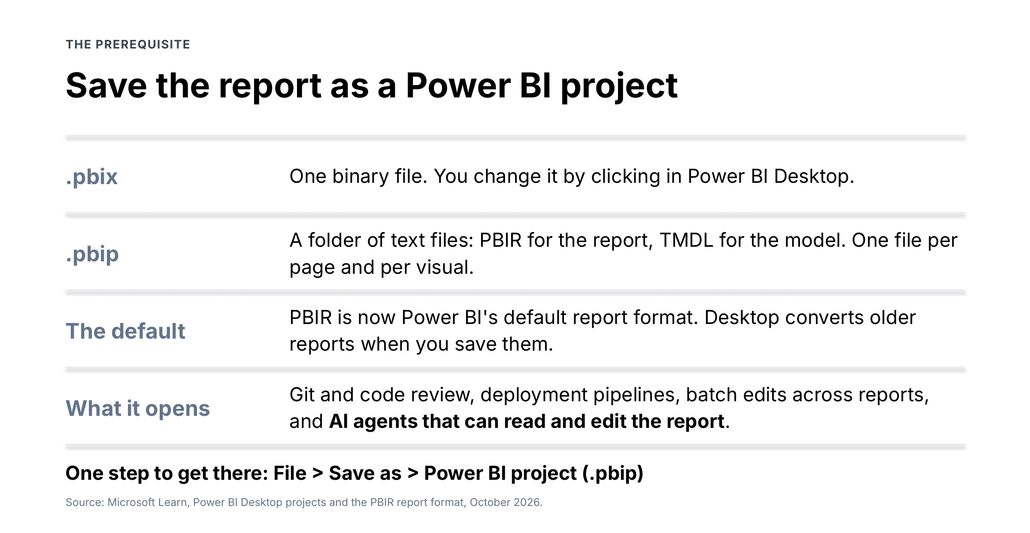
Before you can hand your report over to an AI agent, you need to save it in a different format.
When you save the same report as a Power BI project (PBIP), you get a folder instead of a single file. The report is stored in PBIR format, the model has its own folder, and the TMDL files are plain text, with one file per page and per visual.
PBIP is becoming Power BI’s default, and Power BI Desktop converts older reports when you save them, so you may already be halfway there. It’s also what Git, code reviews, and deployment pipelines need, and Microsoft’s own report skills require it too. Most importantly, it’s what lets an AI agent read and edit your report.
How an AI agent builds your Power BI report
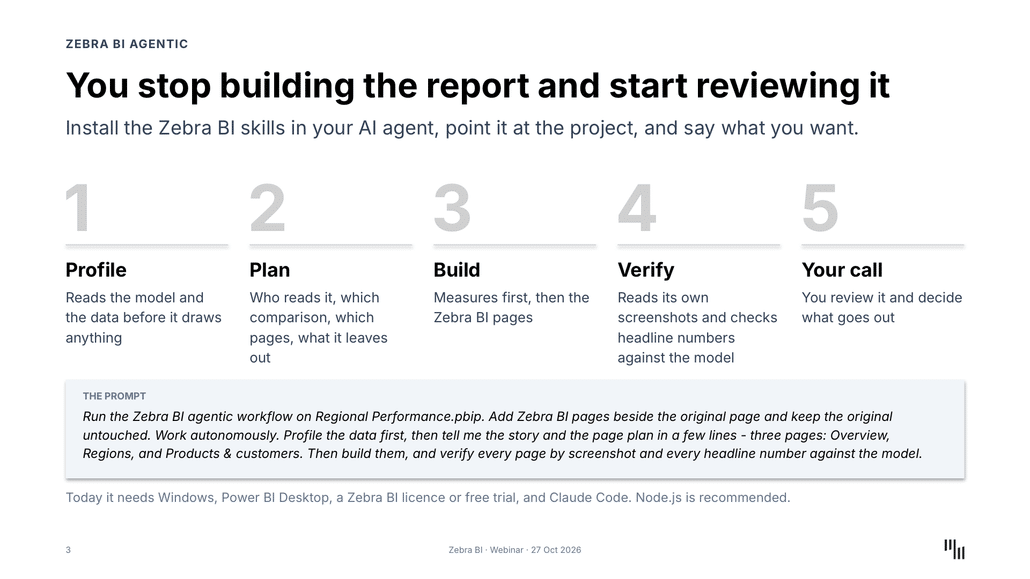
When editing a report with an AI agent, you only need to describe what you want. In the webinar demo, the prompt asked the agent to:
- add Zebra BI pages next to the original page for comparison
- leave the original page untouched
- work on its own
From there, the agent works in 5 steps:
- Profiles your data before building anything.
- Proposes a story and a page plan in a few lines.
- Writes the measures, tests them against the model, and then builds the pages.
- Checks its own work by taking screenshots and comparing every headline number with the model.
- Hands the result to you for review.
By default, the agent shows you its plan so you can adjust it. You can also tell it to work on its own, as in the demo.
What the AI agent found in the Power BI report
The demo used a one-page report shared in the Power BI community, with a map, donut charts and trend lines. It was supposed to answer a simple question: did sales grow compared to last year, and what's behind it? From that page alone, it was hard to tell.
Before building anything, the agent queried the model and found the answer: sales fell 2.7% to 76.2 million. The first time it ran on this report, it also found a problem nobody had asked about. The calendar stopped on December 30, 2017, so 12 orders worth about 300,000 on December 31 were missing from every number, including the original page. The agent fixed the date table so every page now includes that day.
Then, it built the following 3 pages next to the original:
- Overview. It opens with the answer, as a headline sentence written as a measure, so it updates when you change the year or quarter. Five KPI cards compare each figure with last year, and the units and average price cards split the drop into volume and price.
- Regions. West lost the most, and Central was the only region that grew. The comments explaining this are also written as measures and sit right on the data points.
- Products and customers. Each is ranked as the top 15 plus one row for everything else. One product alone accounts for almost all of the drop.
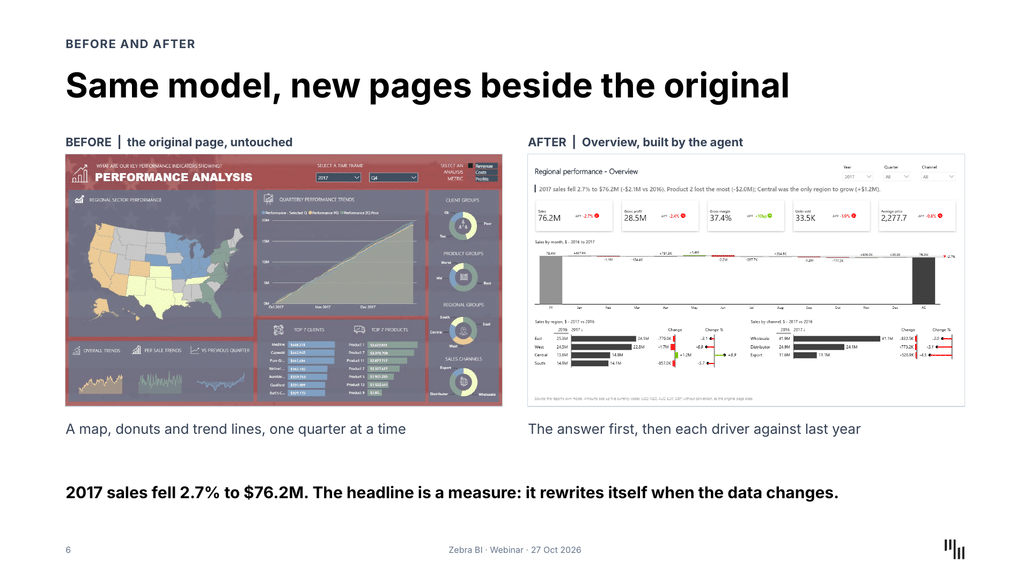
The agent also reviewed its own screenshots and fixed what it found, including a headline that was cut off, titles that didn’t display correctly, and a footnote that needed fixing.
In the final round, it reopened the report, took a screenshot of every page, and ran a query for every headline number. All four pages rendered, every headline matched the model, and the original page was untouched.
It also told what it couldn’t fix. Revenue in the model adds up amounts in 5 different currencies, which was also the case in the original report. The agent didn’t hide this and it added a footnote to every page so you can decide how to handle it.
What you need to use Zebra BI Agentic:
- Windows and Power BI Desktop
- A Zebra BI license or a free trial
- Claude Code or another AI agent
- A model with separate measures for actuals and plan or prior year, and preferably a marked date table. If the measures don’t exist yet, the agent can write them.
Pick a report with at least 2 years of data, or a plan or forecast, so there’s something to compare against.
For step-by-step setup instructions, see our Zebra BI Agentic guide
Why you still need to review your AI-built Power BI report
BI Solutions Director Mark Leskovšek ran the demo and admits he was skeptical at first. He expected the agent to produce a decent first draft that he’d still have to fix by hand.
Instead, it found and fixed the problems on its own, and he didn’t have to touch his mouse. But some decisions are still yours, like how to handle the currencies, and you still have to review every page before it goes out.
Another way to use AI: Zebra AI in Microsoft Fabric
Zebra BI Agentic is built for the reports you publish in Power BI, but sometimes you don't need a new report. You need a quick answer from data that already lives in Microsoft Fabric. That's where Zebra AI comes in. You connect your data, and it builds an interactive analysis for you, without any coding or AI agent to set up.
You add Zebra AI to your Fabric workspace and connect your data from OneLake, Power BI, or other sources. Zebra AI cleans the dataset, identifies the business domain, and creates KPIs by grouping columns that belong together. Additionally, you can add your own measures, set your fiscal year, and describe which figures matter most.
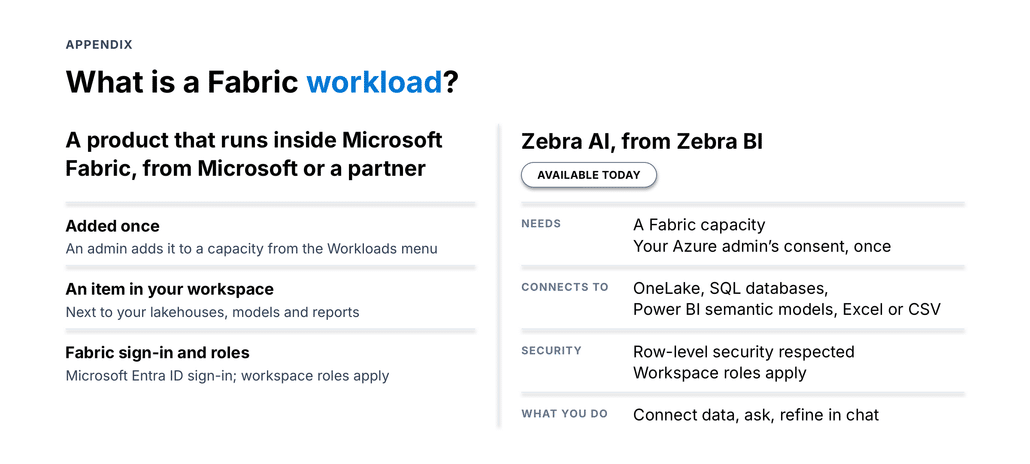
In the demo, we provided it with a profit-and-loss dataset with no additional context. Within a few seconds, it correctly identified a monthly income statement for a manufacturing business and built the analysis.
Every number comes from calculations run by tools, not from text the AI writes. You can format the Zebra BI visuals, ask follow-up questions in the chat, or create a month-end pack that refreshes with your data and can be shared with your stakeholders.
A first look at the next version of Zebra AI
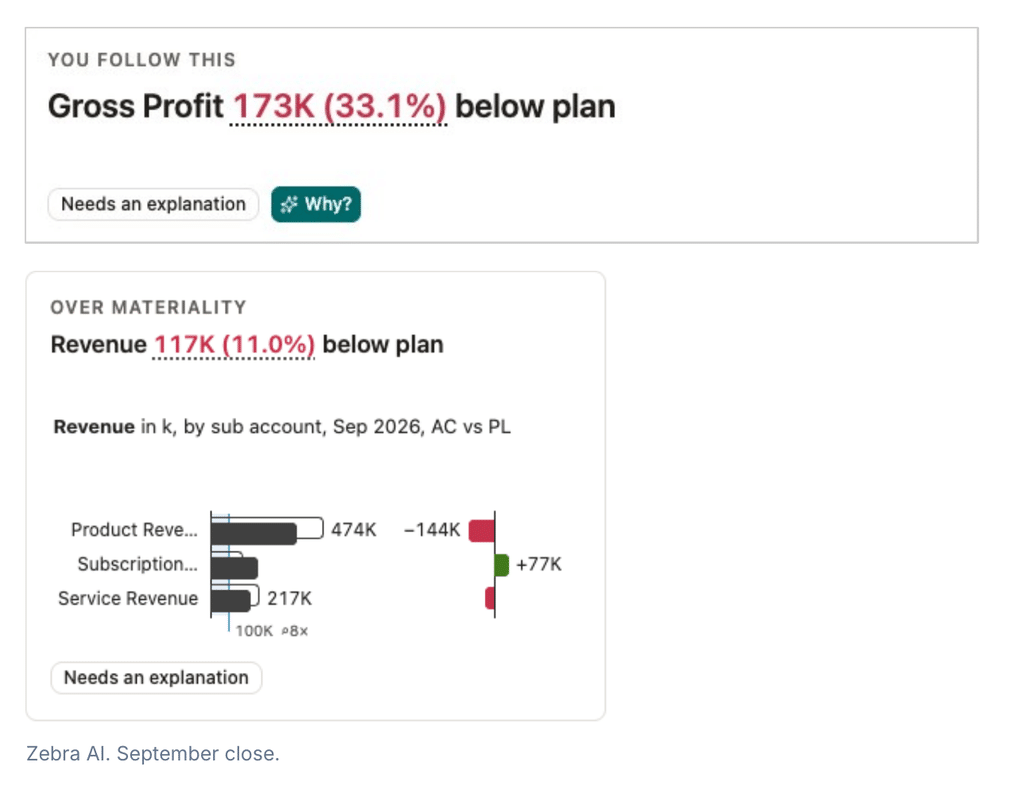
We also showed an early version of what is coming next. Managers get a feed of the variances that matter, with every number showing how it was calculated and who confirmed it. They can ask why a number moved, or tag the person responsible. Analysts get a prepared flux review, drafted answers to likely management questions, and the option to publish to Microsoft Fabric alongside their existing Power BI reports.
Zebra BI Agentic or Zebra AI: which one should you use?
Both use AI to build your reports and analysis, but they fit different kinds of work.
Use Zebra BI Agentic when:
- Your reports live in Power BI and people read them every month
- You want the same structure and notation every time
- You want AI to do the building, so you can focus on analysis and review
- You need to publish and share reports as usual, with row-level security in place
Use Zebra AI when:
- Your data is in Microsoft Fabric and you need a quick, ad-hoc analysis
- You want to ask follow-up questions about your data in a chat
- You don't want to set up an AI agent or write any code
- You need a month-end pack that refreshes with your data
Have an AI agent to build your next Power BI report
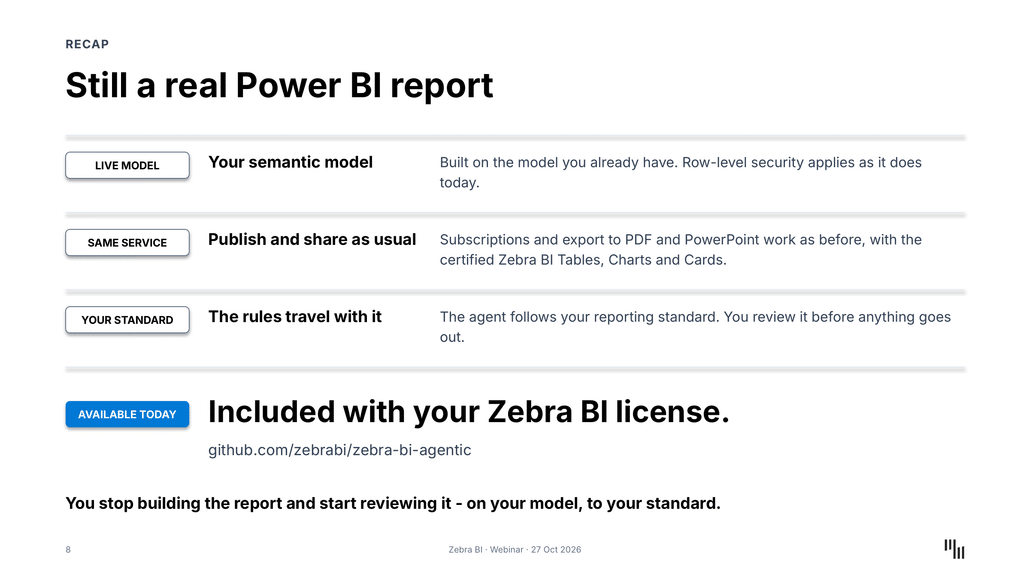
AI can build a Power BI report in minutes, but that doesn't help if you then spend hours checking every number, fixing charts, and re-prompting until the report looks right, only to get a different design next month.
With Zebra BI Agentic, you stop building reports page by page and start reviewing them. What you get is still a real Power BI report on the model you already have. Row-level security applies as usual, and you publish and share it the same way. Zebra BI Agentic is available today and included with your Zebra BI license, and Zebra AI is available today as a workload in Microsoft Fabric.
Pick one report your team reads every month, save it as a Power BI project, and let an AI agent build the new pages for you. Not a Zebra BI customer yet? Start with Zebra BI's free trial and try it on your own data.
Frequently Asked Questions
Are there limits on how much data Zebra AI can use?
Not with a Power BI semantic model. With the new Power BI live connection, Zebra AI reads the model's metadata and queries only what it needs, so you're no longer limited in rows or measures. Limits still apply to Excel files.
Can I load context from Markdown files in Git?
Yes. You work with your own agent, your own context, and your own files, so anything you keep in Git can be used with Zebra BI Agentic.
Which AI coding agent works best?
You don't always need the most powerful model. The skills in the Zebra BI plugin explain how the agent should work with your data and present it, so smaller models like Claude Sonnet also work well.
What if my company doesn't allow AI agents?
It depends on what your company has provisioned. Zebra BI Agentic works in any agent interface, for example, GitHub Copilot in VS Code, and Zebra AI can run as a Microsoft Fabric workload.