
 September 8th
 February 22nd

Power BI licensing explained: what Pro, PPU, and Fabric cost in 2026
Power BI pricing looks simple until you try to license a real team. Picking the wrong plan for your business needs might cost you thousands of dollars a year without you ever noticing.
You can choose between Power BI Pro at $14 per user per month, Premium Per User (PPU) at $24 per user per month, and capacity-based Microsoft Fabric F SKUs (Microsoft's name for its capacity size tiers) that start around $263 per month and run past $8,400 for an F64 on pay-as-you-go.
Which one is cheapest for you depends almost entirely on two numbers: how many people build reports, and how many people only view them. Microsoft publishes what each plan costs, and this guide covers which combination fits your team shape.
This guide walks through all pricing options, the licensing rules that confuse people (one of them, the F64 threshold, changes the math completely), and includes a calculator that compares them for your exact team size.
How much does a Power BI license cost?
Power BI licensing runs from $0 (Desktop) to $14 per user per month (Pro), $24 (Premium Per User), and capacity-based Fabric F SKUs from about $263 to $8,410 per month.
| License | Price (US list) | Who needs it | Key limits |
| Power BI Desktop / Fabric free | $0 | Anyone building reports locally | Can't publish or share via the service (except viewing on F64+, see below) |
| Power BI Pro | $14 per user/month | Everyone who creates or shares reports; all viewers below F64 | 1 GB model size, 8 refreshes/day |
| Premium Per User (PPU) | $24 per user/month | Teams needing Premium features without a capacity | 100 GB models, XMLA, paginated reports; every viewer also needs PPU |
| Fabric capacity (F SKU) | From ~$263/month (F2, PAYG) to $8,410/month (F64, PAYG); 1-year reservations cut roughly 41% | Organizations buying compute instead of (or alongside) per-user seats | Below F64, viewers still need Pro or PPU |
Still not sure which Power BI pricing plan to choose? Here are 3 rules that clear out most of the confusion:
- Creators always pay. Anyone who builds and publishes reports needs Pro or PPU, regardless of the capacity you own.
- The F64 threshold decides whether viewers pay. On a Fabric capacity of F64 or larger, people with a free Fabric license and the Viewer role can view Power BI content at no per-user cost. For anything smaller (F2 through F32), every single viewer still needs a Pro or PPU license in addition to the capacity.
- PPU is not a capacity. It unlocks Premium features per person but provisions no Fabric compute; more on that below.
Hold those 3 rules in mind, and the rest of this guide is just math.
How to calculate your Power BI licensing cost
The rules above will point you in the right direction, but here's a faster way to find the most affordable Power BI pricing plan that still covers your team's needs.
Enter your report creators, your viewers, and whether you need Fabric workloads beyond Power BI. The calculator compares every licensing option at current US prices and shows the cheapest one, plus the breakeven point where a capacity starts to beat per-user licenses.
There's one thing to keep in mind: Fabric prices vary by region, so the calculator uses US rates ($0.18 per capacity unit per hour, roughly 41% off with a 1-year reservation). The F64 rule is applied exactly as Microsoft documents it: viewers are free only on F64 and above.
One thing the calculator doesn't cover: the visual layer you build on top is licensed separately, and it costs the same whether you land on Pro or an F64.
Power BI Pro vs Premium Per User: which per-user license do you need?
Most teams choose between Power BI Pro at $14 per user per month and Premium Per User at $24, simply because they're nowhere near the size where capacity pays off.
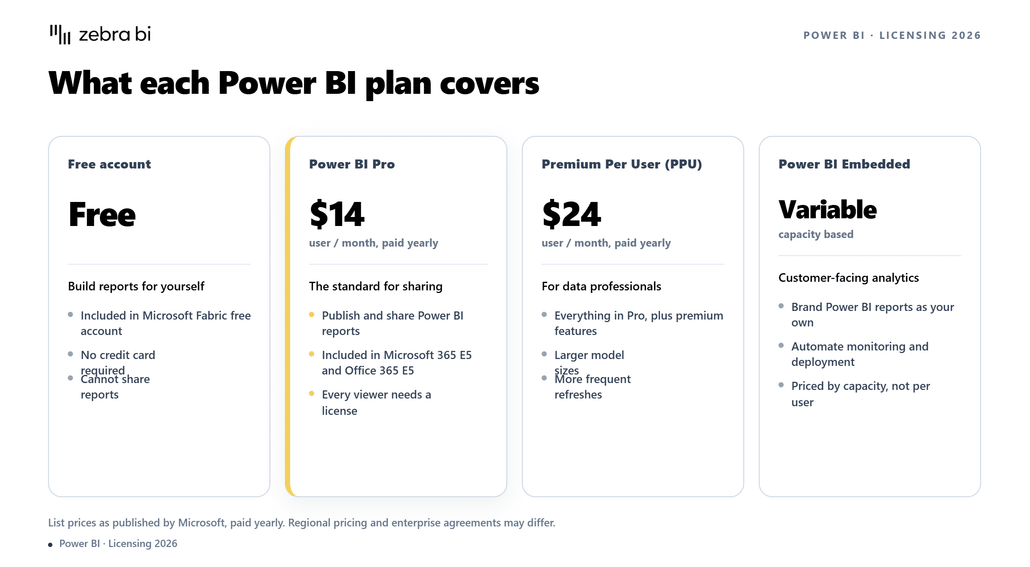
Pro covers publishing and sharing, while PPU adds Premium features like 100 GB models, and PPU only makes sense if everyone who views the content has it too.
What Power BI Pro includes at $14 per user per month
Power BI Pro is the default license for working in Power BI. It helps you publish reports, share them, build workspaces, and collaborate. Every organization using Power BI seriously has at least some Pro licenses, because creating and sharing content requires one.
If your team is on Microsoft 365 E5, Pro is already included, which means your team's Power BI per-user cost is already paid.
Power BI Pro limits semantic models to 1 GB and scheduled refreshes to 8 per day, and it doesn't include Premium features such as paginated reports or XMLA endpoints. So, if you need more than that, you'll have to pay for PPU or capacity, regardless of how few people are viewing your reports.
What PPU adds at $24 per user per month
Premium Per User includes most of the Premium feature set (100 GB models, 48 refreshes per day, XMLA read/write for connecting external tools to your semantic models, paginated reports, deployment pipelines) and licenses it per person rather than per capacity.
In general, PPU tends to be cheaper than a capacity for teams up to roughly 215 users who need Premium features. Just keep in mind that PPU content can only be consumed by other PPU users.
You can't mix a handful of PPU creators with Pro viewers on the same PPU workspace. If 10 analysts need 20 GB models and 150 people need to see the results, PPU means 160 PPU licenses, not 10.
Why PPU is not a Fabric capacity
Premium Per User provides Premium features, not Fabric Compute. No warehouses, no notebooks, no Fabric items at all. Teams sometimes buy PPU expecting a cheaper on-ramp to Fabric, only to end up buying an F capacity anyway.
If Fabric workloads are in your plans, budget for an F SKU from the start.
How much does a Microsoft Fabric capacity cost?
Fabric capacities replaced the retired Power BI Premium P SKUs, and they work differently. You can buy compute measured in capacity units (CUs), billed through Azure, either pay-as-you-go by the second or reserved for a year at a significant discount.
US list prices, per month, assuming 730 hours:
| SKU | Capacity units | Pay-as-you-go | 1-year reservation | Power BI equivalent |
| F2 | 2 | $263 | $156 | – |
| F4 | 4 | $526 | $313 | – |
| F8 | 8 | $1,051 | $625 | EM1/A1 |
| F16 | 16 | $2,102 | $1,251 | EM2/A2 |
| F32 | 32 | $4,205 | $2,502 | EM3/A3 |
| F64 | 64 | $8,410 | $5,004 | P1/A4 |
| F128 | 128 | $16,819 | $10,007 | P2/A5 |
| F256 | 256 | $33,638 | $20,015 | P3/A6 |
The smallest Fabric capacity, an F2, costs about $263 per month pay-as-you-go or $156 per month on a 1-year commitment. Fabric pricing is regional, so treat these as representative rather than exact; the Azure pricing calculator gives the figure for your region. Pay-as-you-go capacities can also be paused and resumed, which matters if your usage is genuinely part-time.
The F64 rule: when viewers become free
On a Microsoft Fabric capacity of F64 or larger, report viewers don't need a paid Power BI license: a free Fabric license and the Viewer role are enough.
Two conditions apply. First, the content has to live in a workspace assigned to that capacity, so free viewing doesn't extend to reports sitting elsewhere in your tenant. Second, free users get read-only consumption, not the per-user capabilities a Pro license carries, such as publishing, sharing, or their own workspace. Below F64, a capacity gives you Fabric compute and Premium features, but every report viewer still needs Pro or PPU on top.
When comparing capacities, F64 is the number you should focus on.
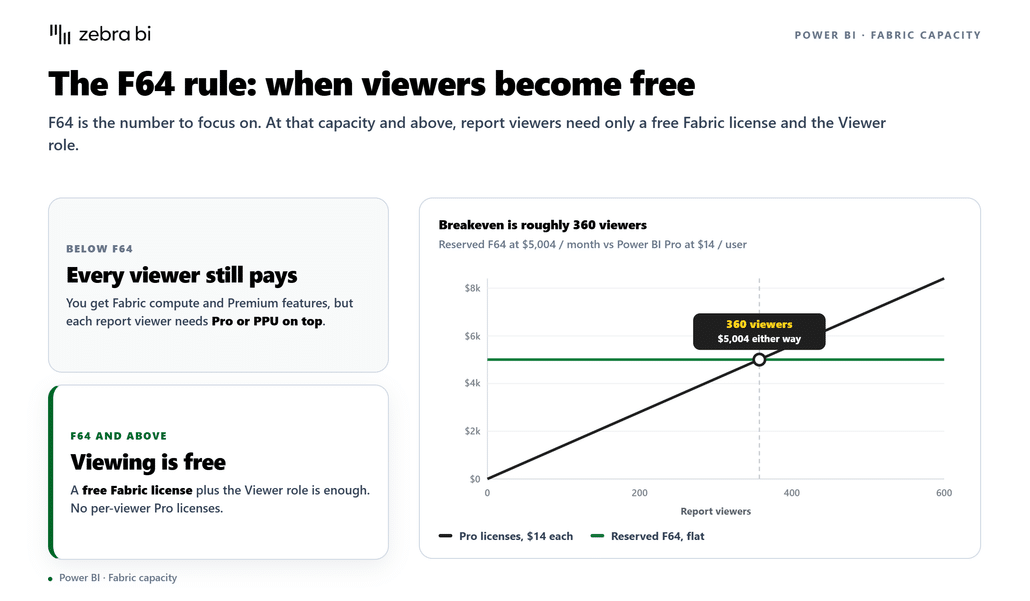
It's also why F64 shows up in budget conversations far more often than F2 through F32 tiers. The breakeven is roughly 360 viewers: a reserved F64 at $5,004 per month costs the same as 360 Power BI Pro licenses at $14.
More viewers than that, and F64 with free viewing is cheaper than putting everyone on Pro. If you've got fewer users, just stick with per-user licensing.
What happened to Power BI Premium P SKUs
Microsoft stopped selling Power BI Premium P SKUs to new customers in 2024 and has been migrating existing agreements to Fabric F SKUs. If you're budgeting from an older internal doc that mentions P1 or P2, those prices no longer apply.
F64 is the functional equivalent of P1, with two operational differences: F SKUs bill through Azure (with regional pricing) rather than the Microsoft 365 admin center, and they can be resized, paused, and reserved like any Azure resource.
Reservation and regional caveats
The roughly 41% reservation discount is the single biggest lever on capacity cost, and it's the assumption you should budget with unless your capacity genuinely runs part-time.
Reservations are billed through Azure like any other reserved instance. And because pricing is regional, two companies buying the same F64 in different Azure regions will pay noticeably different amounts.
Make sure to check your region's rate before signing off on a budget.
What three real team shapes actually pay
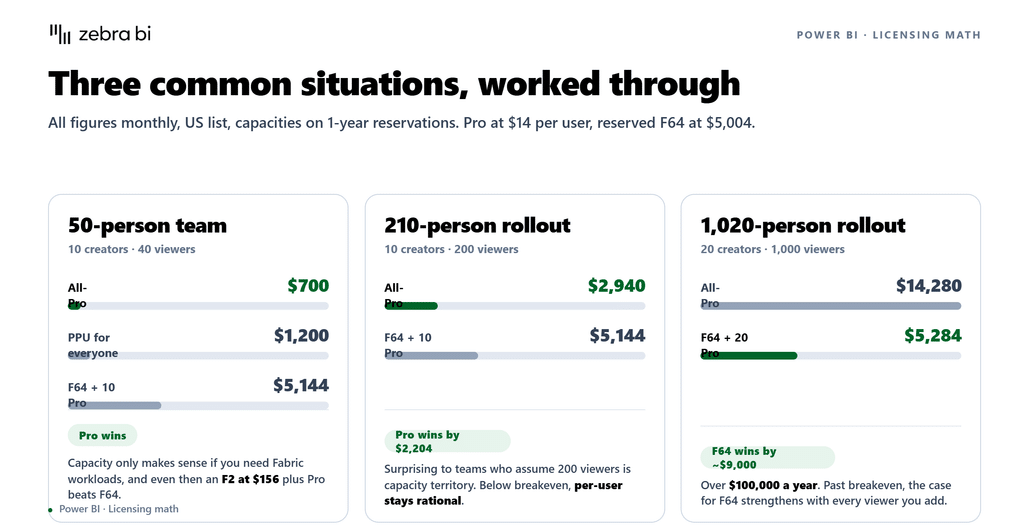
The same math that the calculator runs, worked through for three common situations. All figures are monthly, US list, with capacities on 1-year reservations.
A 50-person finance team: 10 creators, 40 viewers. All-Pro costs 50 × $14 = $700. PPU for everyone costs $1,200. An F64 with free viewers costs $5,004 plus 10 Pro licenses, for a total of $5,144.
In this case, Pro is the budget-friendly option. At this size, capacities only make sense if you need Fabric workloads, and even then, a small F SKU (an F2 at $156 reserved) plus Pro for everyone beats the big capacity.
A 200-person rollout: 10 creators, 190 viewers. All-Pro costs $2,800. F64 with free viewers still costs $5,144. Pro is still cheaper by over $2,300 a month, which surprises people who assume 190 viewers is "capacity territory."
The breakeven sits around 360 viewers, and below it, per-user licensing remains the rational choice.
A 1,020-person deployment: 20 creators, 1,000 viewers. All-Pro costs 1,020 × $14 = $14,280. F64 with free viewers costs $5,004 plus 20 Pro licenses, for a total of $5,284. The capacity saves roughly $9,000 per month, over $100,000 a year.
Past the breakeven, the case for F64 gets stronger with every viewer you add.
On a 1-year reservation, an F64 capacity with free viewers beats all-Pro licensing once you pass roughly 360 report viewers. On a pay-as-you-go license, the breakeven is around 600.
One footnote for Microsoft 365 E5 shops: E5 already includes Power BI Pro, so your per-user cost is effectively paid, and the breakeven logic changes completely. If most of your viewers are on E5, per-user licensing wins at almost any scale unless you need Fabric compute.
What hidden costs come with Power BI licensing?
You might think the license fee is all you need to plan for. However, there are costs that show up later and catch your budget off guard.
Here's what to pay attention to when budgeting for a Power BI license:
Creator licenses on top of capacity. Budget owners sometimes read "unlimited free viewers on F64" as "no more per-user licenses." Creators always need Pro or PPU, so a capacity never fully replaces per-user spend.
Admin and governance time. Capacities need someone to monitor utilization, manage workspaces, and decide what runs where. That's real time from your BI team, and it scales with adoption.
Training and rebuild time. Moving from Excel-based reporting to Power BI, or from P SKUs to F SKUs, brings migration and learning costs that never appear on a pricing page.
The biggest one: reports nobody acts on. Plenty of BI rollouts end with dashboards that don't change a single decision, and none of that failure shows up in the licensing line. A report earns its place when a reader can answer four questions without calling an analyst: is performance good or bad, by how much, why, and what to do next.
Once you've sized that licensing correctly, the next question is what those reports do when they land. The harder problem is the gap between a published report and a decision, and it's a reporting-design question, not a licensing one.
That gap usually starts with a report an executive has to decode before they can use it.
If that's the gap you're worried about, it's worth testing on your own reports before you finalise the licensing decision.
Try Zebra BI free for 14 days →
Where Zebra BI fits into your Power BI budget
Zebra BI is a set of 3 certified Power BI visuals (Tables, Charts, and Cards) that work inside Power BI and produce IBCS-conformant (International Business Communication Standards), boardroom-ready financial reports.
Certification means the visuals passed the Power BI team's code review, which tests that they call no external services, so your data never leaves your tenant. They run in Power BI Service, Desktop, mobile, and embedded.
It extends Power BI's native visuals for the parts of financial reporting that need IBCS structure: variance calculations that update automatically without custom DAX (Power BI's formula language), hierarchical P&L structures that survive drill-down, IBCS-conformant small multiples and waterfalls, and comments anchored to individual data points rather than to the report as a whole.
Finance teams at AbbVie use Zebra BI to build self-service dashboards that reduce how often they need IT to produce a report, and over 3,000 companies use it, including Deloitte and Bayer.
Regarding cost, Zebra BI is licensed per user on top of your Microsoft licensing, just like Pro.
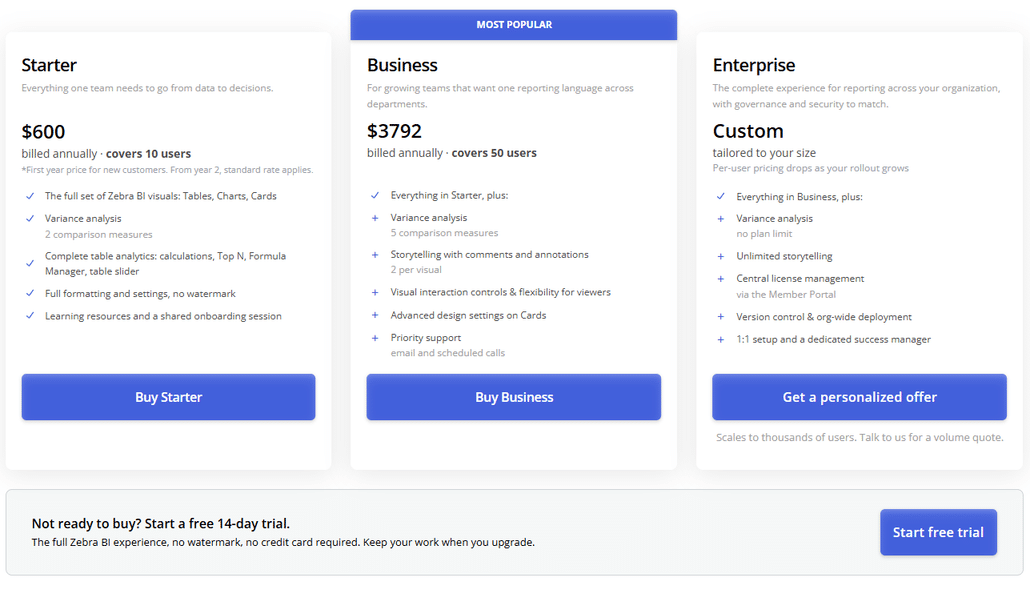
The Starter plan covers 10 users for $600 (or €504) , and the Business plan covers 50 users for $3,792 (or €3,240) per year.
Everyone who views or edits a Zebra BI report needs a seat, so the per-user rate is what matters at scale rather than the plan tier. Larger deployments move to Enterprise, which is quoted rather than list-priced and where the per-user rate falls as seat count rises.
Zebra BI Business adds about $316 per month (€270) on top of the roughly $700 you're already paying for Power BI Pro. Nothing in the licensing above changes.
What it changes is what those licences produce: reports a board can read at a glance, instead of a walkthrough.
Start your free Zebra BI trial → OR
Works on any Power BI licence - Free, Pro, PPU or a Fabric capacity. Nothing in your Microsoft licensing changes.
Frequently Asked Questions
How much does Power BI cost per user?
Power BI Pro costs $14 per user per month, and Premium Per User costs $24 per user per month (US list price, in effect since April 1, 2025). Power BI Desktop is free, but you can't publish or share reports. On a Fabric capacity of F64 or larger, report viewers pay nothing per user.
How much does Power BI cost?
Getting started with Power BI costs between $0 (Power BI Desktop) and $14 per month (Power BI Pro) for a single analyst. For a team, multiply Pro or PPU by headcount, or price a Fabric capacity: F SKUs run from about $263 per month (F2, pay-as-you-go) to $8,410 per month (F64), with 1-year reservations roughly 41% cheaper.
Is Power BI free in Office 365?
Power BI Pro is included in Microsoft 365 E5 and Office 365 E5. Other Microsoft 365 plans don't include it; users on those plans need a separate Pro or PPU license to publish or share reports.
Do report viewers need a Power BI license?
Report viewers need a Power BI Pro or PPU license unless your organization runs a Fabric capacity of F64 or larger, where a free Fabric license and the Viewer role are enough. For smaller F SKUs, or when there's no capacity at all, every viewer needs Pro or PPU. Report creators always need Pro or PPU.
What is the difference between Power BI Pro and Premium Per User?
Pro ($14/user/month) covers publishing, sharing, and collaboration with 1 GB models. PPU ($24/user/month) adds Premium features: 100 GB models, more refreshes, XMLA, and paginated reports. The catch: PPU content can only be viewed by other PPU users, and PPU provides no Fabric capacity.
How much does an F64 Fabric capacity cost?
Roughly $8,410 per month on US pay-as-you-go pricing, or about $5,004 per month with a 1-year reservation. Prices vary by Azure region. F64 is the smallest SKU that free-license users can use to view Power BI content.
Is Power BI Premium being discontinued?
Premium P SKUs are no longer sold to new customers (since 2024); existing customers are migrating to Fabric F SKUs. Premium features live on in PPU and F capacities. F64 is the functional equivalent of the old P1.
Sized your Power BI licensing? The next decision is what those reports look like when they land.
Prices verified August 2026. Sources: Microsoft Power BI pricing, Microsoft Fabric licenses documentation, Azure pricing calculator.
Microsoft, Power BI, Microsoft Fabric, Microsoft 365, Office 365, Azure, and PowerPoint are trademarks of the Microsoft group of companies. All other trademarks are the property of their respective owners. Zebra BI is an independent software vendor and is not affiliated with, sponsored by, or endorsed by Microsoft Corporation.
