Price-Volume-Mix Variance Analysis template in Power BI


Overview
A Price-Volume-Mix Analysis Report is a powerful tool commonly used in finance, sales, and business analytics to understand how changes in price, volume, and product mix impact revenue or profit. It breaks down revenue fluctuations into three key components: Price Effect (impact of pricing changes), Volume Effect (changes in the actual quantity sold), and Mix Effect (shift in product or service mix).
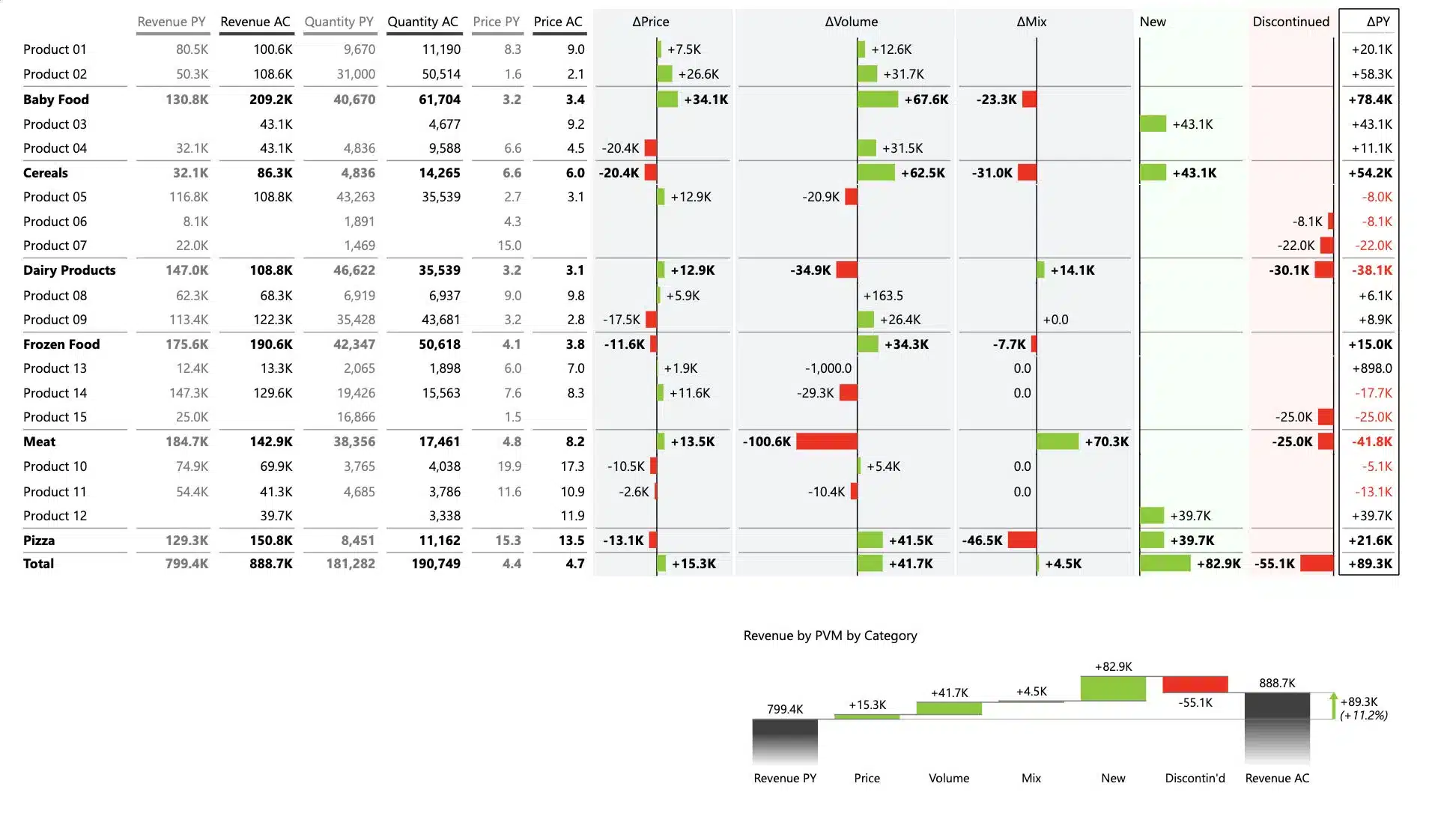
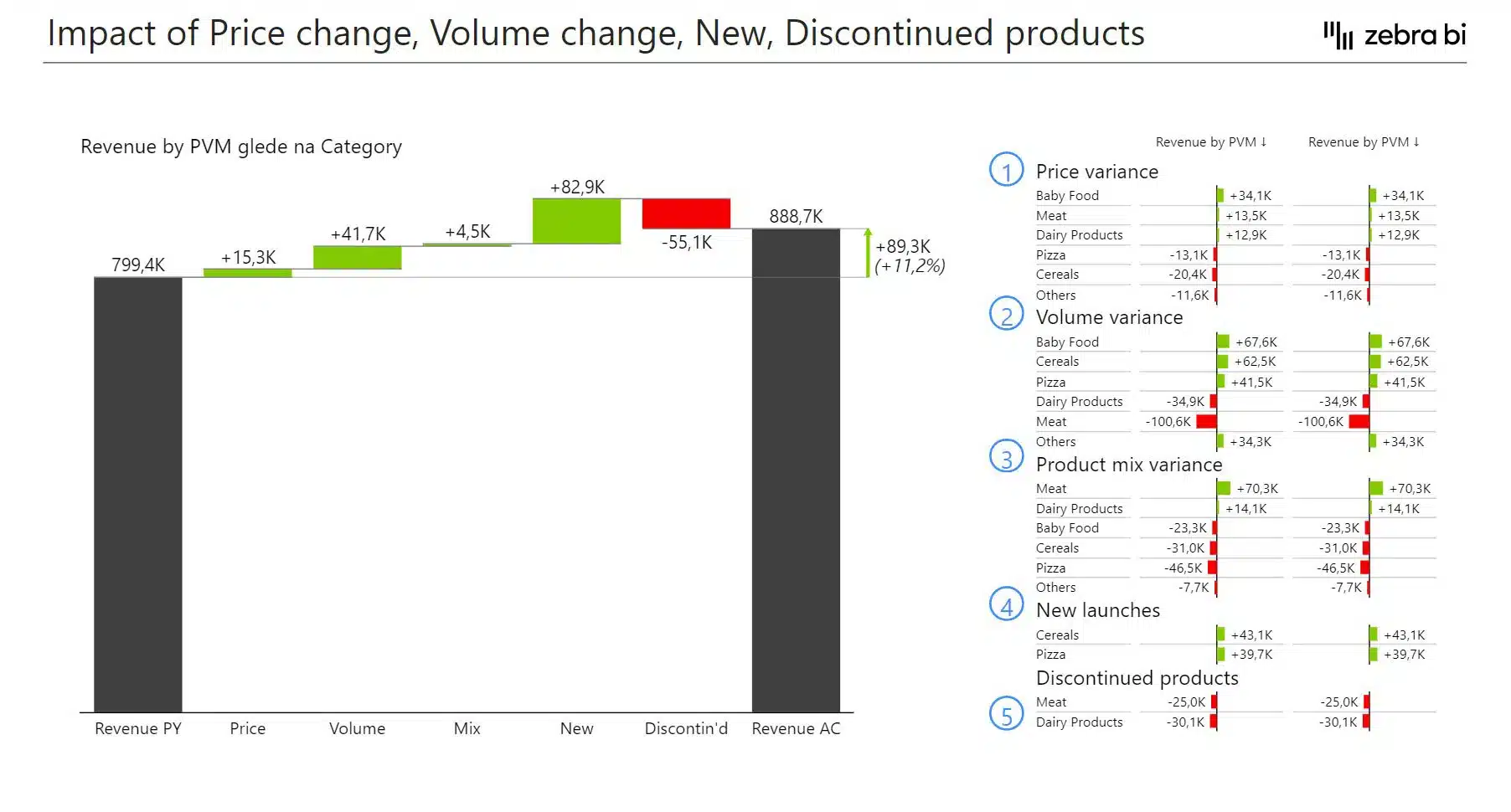
Built entirely with Zebra BI visuals, the report showcases how each factor—including new launches and discontinued products—contributes to revenue performance using intuitive waterfall charts, variance tables, and small multiples for detailed analysis by category and region. No DAX formulas or complex formatting needed—just powerful insights, fast.
Who is this template for:
This Price Volume Mix Analysis Power BI template is designed for finance professionals, business analysts, controllers, and FP&A teams who need to analyze and explain changes in revenue. It’s especially valuable for:
- Finance teams (for profitability analysis)
- Sales & marketing departments (to track price and volume trends)
- Business strategists (for informed decisions about product and pricing)
- Retail & eCommerce businesses (to analyze SKU performance)
Whether you’re in consumer goods, manufacturing, retail, or services—anyone looking to understand revenue drivers will benefit from this report.
What is a Price Volume Mix Analysis?
PVM stands for Price, Volume, and Mix analysis. It’s a technique used to understand the key drivers behind revenue changes over time. By isolating how much of the revenue movement is due to pricing strategies, quantity sold, or changes in the product/customer mix, PVM analysis offers a deep, actionable view into business performance. It helps explain not just how much revenue changed—but why it changed.
What business insights will this Power BI Price Volume Mix Analysis template offer?
The Price Volume and Mix Analysis report helps you answer critical business questions such as:
- What’s driving our revenue growth or decline?
- Are we selling more, or just charging more?
- Which product categories or regions are improving and which are underperforming?
- How are new or discontinued products affecting our results?
This report helps you answer critical business questions such as:
- What’s driving our revenue growth or decline?
- Are we selling more, or just charging more?
- Which product categories or regions are improving and which are underperforming?
- How are new or discontinued products affecting our results?
With these insights, you can:
✅ Revenue & Profitability Insights – Understand why revenue is increasing or decreasing.
✅ Strategic Pricing Decisions – Identify whether price adjustments are helping or hurting the business.
✅ Sales Performance Tracking – Evaluate whether revenue growth is from increased sales volume or product mix changes.
✅ Product Portfolio Optimization – Focus on the most profitable products.
✅ Forecasting & Budgeting – Predict how pricing, volume, and the mix between them changes impact future performance.
Why use this Price Volume Mix Analysis template?
This Power BI example is designed to apply best practices in data visualization right out of the box. It enables you to:
- Communicate complex variance analyses clearly and efficiently
- Use visual storytelling to make reports understandable at a glance
- Avoid complicated DAX measures or manual chart tweaking
- Build waterfall charts, small multiples, and integrated variance tables with just a few clicks using Zebra BI visuals.
Whether you’re reporting to executives or diving into detailed analysis, this template ensures your message is crystal clear—and your data actually drives decisions.
Zebra BI charts, tables or cards used in this Price Volume Mix template
This Price Volume Mix analysis template uses the best Zebra BI features to help you draw more accurate insights, faster and easier. Here's a quick rundown of what you will find in this Power BI template:
Zebra BI Charts:
- Create powerful out-of-the-box waterfall charts with difference highlights to clearly explain contributions to revenue change (e.g., impact of price change, volume growth, their mix variance, and so on)
- Visualize the positive and negative impacts of each driver in line with business communication standards, making performance easier to understand for stakeholders
- Use small multiples waterfall charts for side-by-side comparisons across product categories or regions—ideal for scalable, detailed overviews
Zebra BI Tables:
- Designed for effective variance analysis, essential in PVM reporting
- Combine tabular data with integrated variance charts to show key differences in revenue, prices, and quantities
- Automatically highlight important deviations as per business communication standards, making it easy to detect trends and outliers instantly
Why is Zebra BI’s template the right choice for you?
All Zebra BI templates are designed using IBCS® principles and real-world reporting experience. They help you build professional reports faster, reduce manual work, and ensure your insights are clear, consistent, and actionable — every time.
How this Price Volume Mix variance template works
Getting started is quick and easy — even if you’re not a Power BI expert.
1. Download this power bi template/example to find best practices and inspiration for actionable reporting techniques.
2. Use sample data to test it out and checks what is the background to find application to your use cases.
3. Start a free trial or and other Zebra BI plan to create PVM analysis reports with Zebra BI visuals on your own data.
Inside this template
Get started in 3 steps
Fill out the form and get the Power BI template